For telecallers, agencies & local sales teams

Justdial Extractor for Indian calling teams

Justdial Extractor is Windows software for telecallers, agencies, and local sales teams who want a calling list from Justdial listings. You choose a city and a category, pull the public fields the listing shows, and export Excel. Then the floor dials. You stop copying numbers one by one from the browser.

You are not buying an official Justdial product. You are buying a desktop app so one person is not stuck copying mobiles while five callers sit idle.

Paid software · ₹2,000 per year · Windows · 12 months Independent software by MediaByteX. Not affiliated with Justdial.

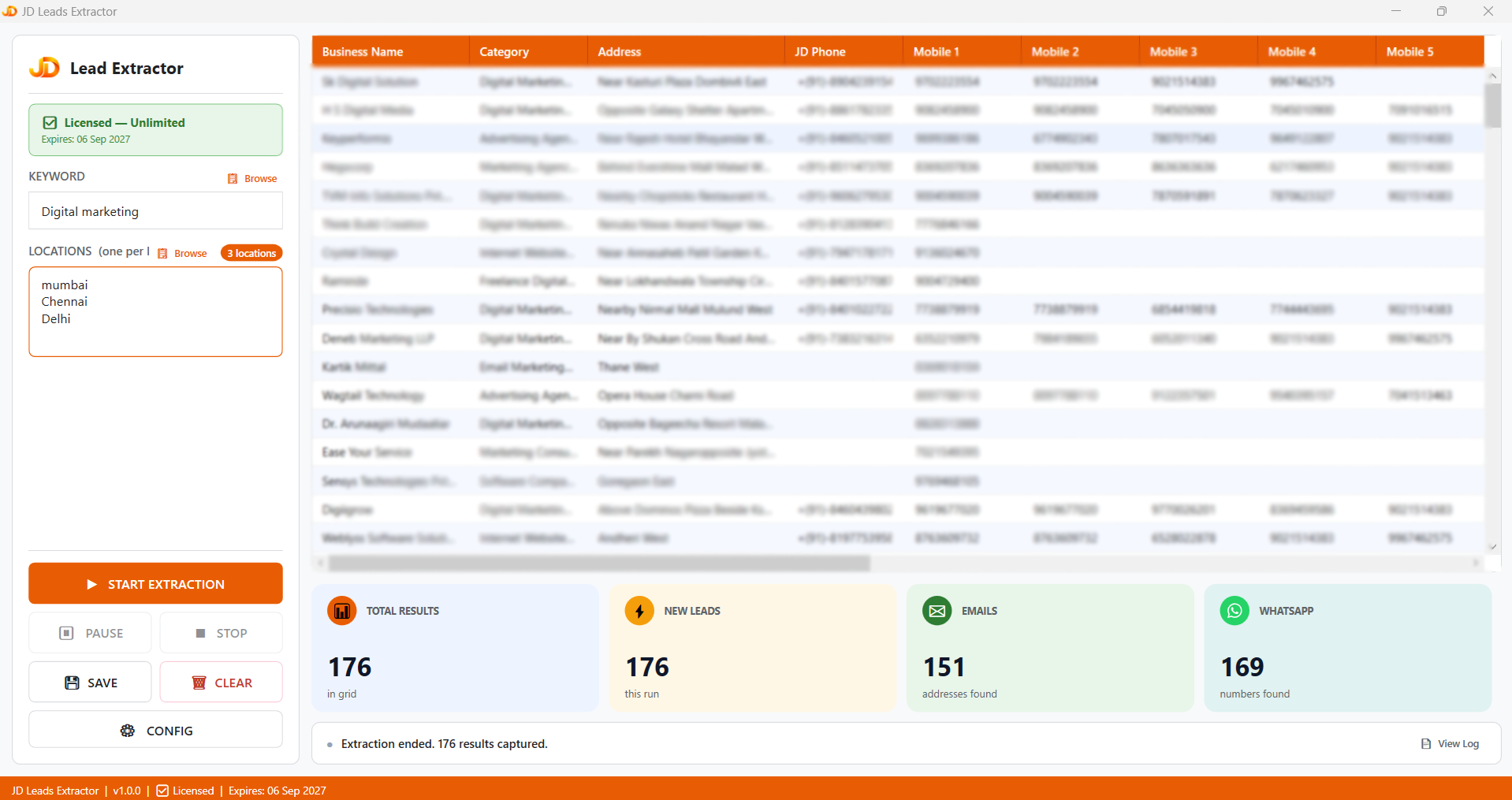
  • Sample run: 176 leads
  • 169 WhatsApp numbers
  • 151 emails captured
Justdial Extractor Windows app after a Digital marketing run for Mumbai, Chennai and Delhi Sample run · 176 rows
Why teams buy this

The hour your callers currently waste

A supervisor at the desk. Justdial on one screen. A blank sheet on the other. The brief is simple: this category, this city. Someone clicks, copies, pastes. A caller asks if the list has come. Not yet. Salary is running. Conversations are not.

Doing it by hand

  • Open a listing, copy the name, copy the number, paste into Excel, go back
  • The second mobile and WhatsApp sit on the card and nobody copies them
  • Callers wait while one person hunts numbers
  • You finish one city and the afternoon is gone

With Justdial Extractor

  • Type the buyer you sell to, add cities, start the run, save Excel
  • JD phone, extra mobiles and WhatsApp land in the same row
  • Hand the sheet to the floor or drop it in a dialer
  • Cover more than one city without repeating the whole process
How you get the list

How a justdial data extractor run works

Choose the listing set, extract the public fields, export Excel for the floor. Some people search justdial scraper and want a workaround guide. This page will not teach that. Justdial Extractor tool is a Windows product. You choose a set. You export a file. You follow the platform terms.

1

Choose the listing set

Type the category — the same kind of phrase you would type on Justdial. Add cities, one per line. Cover more than one market in the same run.

2

Extract the fields

Start extraction. The app writes public listing fields into rows. If a field is not on the listing, the cell is empty. That is expected.

3

Export Excel for the floor

Save the sheet. Hand it to callers, a dialer, or Google Sheets. Listing set, fields, file. That is the justdial to excel path.

What your team walks away with

A sheet they can actually dial from

It does not replace your callers. It replaces the copy-paste hour. Justdial Extractor software writes what the listing already shows.

Numbers that actually ring

JD phone plus up to 5 mobiles on each lead, when the listing has them.

WhatsApp on the same row

In this sample run, 169 of 176 leads came with WhatsApp. Not a promise for every category.

Email when the listing has it

151 emails in that same sample file, so one missed call is not always a lost lead.

Excel for the dialer

Save Excel and drop it into your dialer, Google Sheet or CRM. Thin listings stay thin. Complete listings stay usable.

City-wise campaigns

One keyword, many cities. Split the sheet later if a client wants city tabs.

One price for a full year

₹2,000 for a Windows licence. No per-lead fee during that year. Row count still follows Justdial.

Inside the Excel file

Fields the app actually writes

Each row is a business you can contact, where the listing has the field. Sample run on this page: Digital marketing across Mumbai, Chennai, Delhi — 176 rows. A sample, not a monthly guarantee.

Business Name Category Address JD Phone Mobile 1–5 WhatsApp Email Website
India examples

Example lists Indian teams actually ask for

These are examples. Volume depends on what Justdial currently shows. Thin categories and smaller towns return fewer rows. Change city or category and run again.

Example 1

Packers and movers in Pune

A shifting brand, or an agency filling a client moving campaign, needs owners and branch contacts, not screenshots. Category: packers and movers. City: Pune. Export. The calling team works Pune only. Extra mobiles stay on the same row, so the second attempt is not another hunt on Justdial.

Example 2

Beauty parlours in Lucknow

A salon-product distributor wants parlours that can take a demo this month. Category: beauty parlour. City: Lucknow. The sheet gives a name, an address so you can judge the area, and a number to call. If email is present, a missed ring is not the end of the lead.

Watch before you buy

This is a real extraction, not a mockup

“Digital marketing” across Mumbai, Chennai, Delhi became 176 rows. Sample run only.

Enter keyword and cities, click Start Extraction, save Excel, start calling.

Who this is for

If your floor needs a list this week

Telecalling teams

Local numbers on the dialer this week, not a stale bought database.

Agencies

City-wise prospect lists for a client campaign, without a research intern copying cards all day.

Local service businesses

Shops, clinics and offices in your own town — pest control, interiors, AMC, packing.

B2B sales

Pick a category, export the sheet, book meetings instead of browsing Justdial between calls.

Same product, other search

Justdial lead extractor for agencies and callers

If you need to extract leads from justdial for a client in three cities, add the cities and split the file later. justdial leads belong in a sheet, not in a WhatsApp group full of listing photos. Open the Justdial Lead Extractor page if that is the phrase your team searches. Same Windows app. Same Excel file.

Honest limits

What this tool does not do

It is not official Justdial software and not a partner product. It does not log into a Justdial account. It does not bypass checks, hide activity, or pull private data that is not on the listing. It will not call, message, or email anyone for you. It does not promise unlimited leads. You get the listings that city and category currently show. Email and extra mobiles appear only when they exist. It runs on Windows, not as a Chrome add-on. It is not our Google Maps extractor.

If your source is Maps, use Google Map Lead Extractor. If your source is Justdial listings, this is the one.

Simple offer

Justdial lists for ₹2,000 a year

Less than one wasted caller-day. Windows licence for 12 months. No per-lead fee during the licence year. How many rows you get is still Justdial inventory.

  • No per-lead billing this year
  • Multiple cities in one run
  • Excel your team can dial from
  • 1 year licensed Windows access
Pay once ₹2,000 for a full year Message +91 96475 04140 Call +91 96475 04140 WhatsApp us, pay, get the software, start extracting.
Prefer a call back?

Leave your number. We call you.

Tell us what you want to extract. We call or WhatsApp you from +91 96475 04140, Mon–Sat, 10 AM–7 PM IST. Paid software: ₹2,000 per year.

Call +91 96475 04140

We use your number only to reply about Justdial Extractor. See our Privacy Policy.
Before you invest

Questions people ask before buying

What is Justdial Extractor?

Windows software that takes a city and category listing set from Justdial, writes public fields into rows, and saves Excel for calling teams.

Is this the same as a Justdial Lead Extractor?

Yes. Same product. That phrase is what agencies type when they need a calling list tonight. The Windows window is labelled JD Lead Extractor.

Which fields come in the sheet?

Business name, category, address, JD phone, extra mobiles when present, WhatsApp, email, and website.

Can I run more than one city?

Yes. Add one city per line and start one run.

Is this official Justdial software?

No. Not a partner product. Follow Justdial terms and Indian IT / data rules.

Do I get every mobile, WhatsApp, and email?

Only when the listing has them. Empty cells are normal.

I searched justdial number extractor. Is that a separate tool?

No. Numbers sit in the same Excel row as the rest of the listing. There is no separate number-only product.

How do I buy it?

WhatsApp +91 96475 04140. Price is ₹2,000 for one year on Windows.

Use listings the right way

Follow Justdial’s terms of use and Indian IT / data protection rules. Use extracted leads only for lawful, responsible outreach.

Don’t let another calling day start with an empty list.

Phone, WhatsApp and email in Excel. ₹2,000 for 12 months. No per-lead fee.

Talk to us on WhatsApp Call +91 96475 04140
Buy on WhatsApp Call